Running an Audit Campaign in YeshID
Last updated: August 28, 2026
An audit campaign is how you run a user access review (UAR) in YeshID: you freeze a point-in-time picture of who has access to which applications, hand each application to the person who actually knows whether that access is right, capture their decisions, remove what shouldn't be there, prove it was removed, and export the whole thing as evidence for your auditor.
It's a good fit when you need a repeatable, defensible access review — SOC 2, ISO 27001, SOX — especially if your application owners are spread across the business and aren't YeshID admins.
Access: Audit campaigns are available to org Administrators and to anyone granted the Auditor role. Auditor grants full audit access (manage audit campaigns, view audit workflows) without any other admin privileges — so you can let a compliance or IT lead run audits without making them an admin.
What it provides
One review across every app, connected or not. Apps YeshID integrates with sync automatically; everything else accepts a CSV or a screenshot of the app's user table.
A locked baseline. Once you capture the snapshot, later syncs and access requests can't quietly change the dataset your reviewers are deciding on.
Decisions pushed to the people who know. Application owners certify their own apps without needing admin rights or a YeshID tutorial.
Remediation that actually runs. Removals become real workflows in YeshID, then get verified against the app.
Evidence you can hand over. Every artifact is hashed and stored, and the campaign exports as a PDF report.
Definitions
Term | What it means |
|---|---|
Campaign | One access review, start to finish. Has a name, a deadline, owners, and a set of applications. |
Scope | One row of the review: this application (or this resource within the app), with its own certifier and remediator. One app can appear in several scopes. |
Finding | One line item inside a scope — usually one individual's access to one app. This is what is audited and acted on. |
Owner | Runs the campaign. Sets it up, captures the snapshot, nudges people, closes it. Can do anything a certifier or remediator can. |
Certifier | Decides, per finding, whether access is kept, removed, or changed. Usually the application owner. |
Remediator | Executes the removals and confirms they took effect. At most orgs this is the same person as the certifier. |
Auditor (role) | An org-level role that allows someone to manage audit campaigns without being a YeshID administrator. |
Snapshot | The frozen dataset the whole campaign runs on. Captured once, before certification starts. |
Evidence Vault | Every artifact the campaign produced — snapshots, uploads, verification results — each with a SHA256 hash. |
The Four Phases
Every campaign moves through the same four phases, and the tabs across the top of a campaign follow them in order:
Phase | Tab | Who acts | Campaign status |
|---|---|---|---|
1. Snapshot | Snapshot | Owner | Waiting for Snapshot |
2. Certification | Certification | Certifiers | In Review |
3. Remediation | Remediation + Verification | Remediators | In Review |
4. Close | Close Audit button, top right | Owner | Closed |
Two more tabs — Evidence Vault and Audit Trail — collect proof as you go, and Export produces the report at the end. All five tabs after Snapshot stay locked until the snapshot is captured.

Part 1: Set up the Campaign
Start a new campaign
Go to Access > Audit Campaigns and click Start audit campaign.
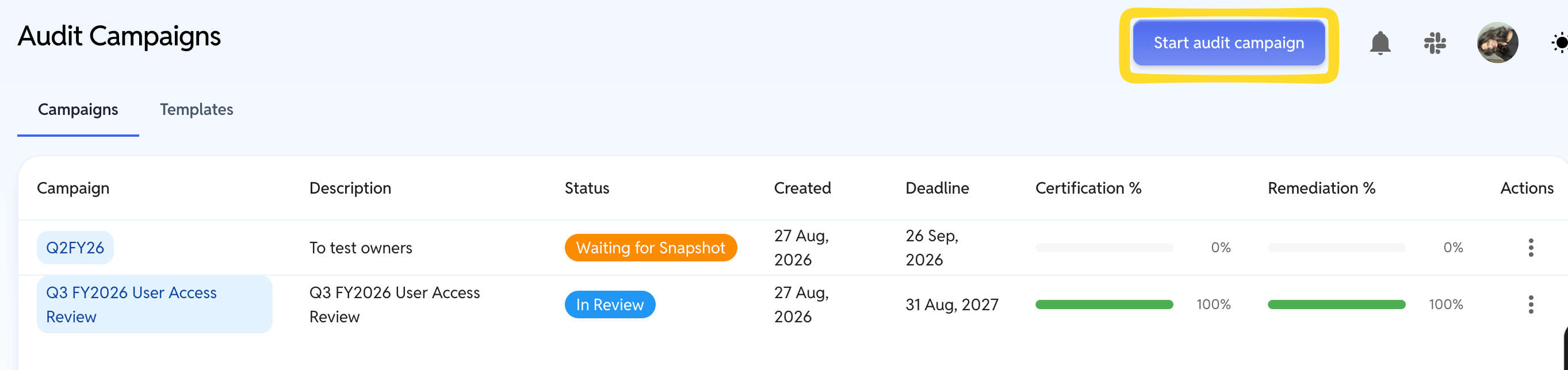
Note: If you are using a template, see Templates section of this doc.
Name it and assign owners
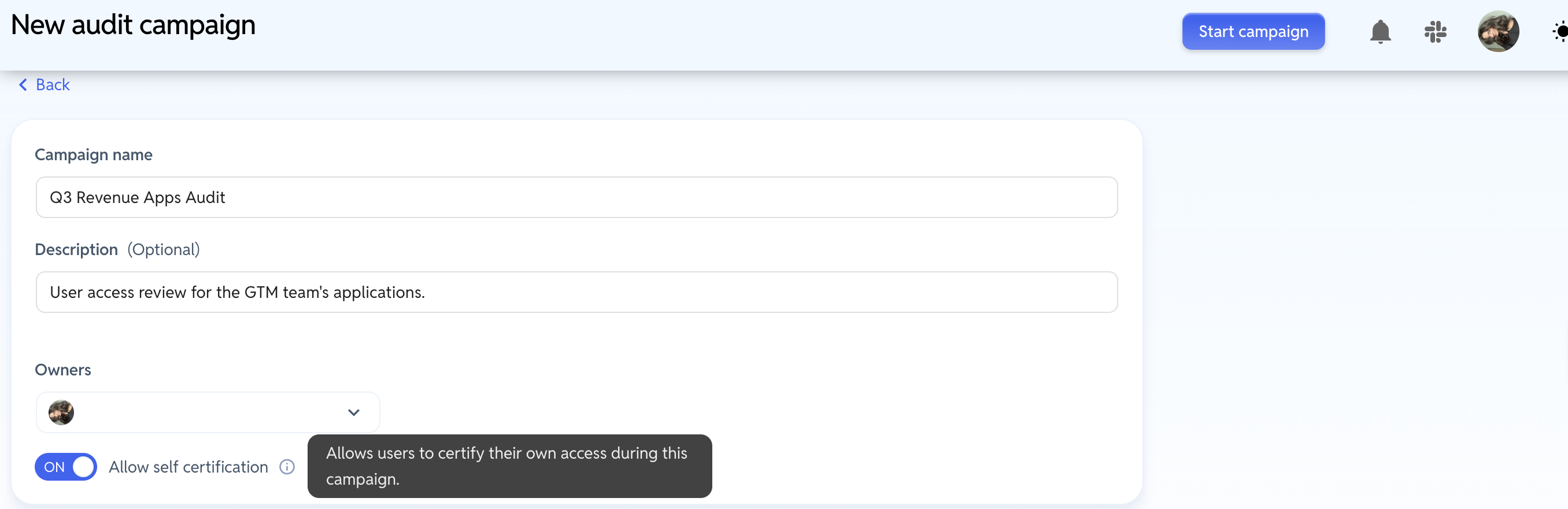
Fill in:
Campaign name: Use something an auditor will recognize a year from now, e.g.
Q1 2026 SOX Compliance Review.Description (optional, 250 characters): The purpose of the review.
Owners: The people accountable for the campaign end-to-end. Owners can act on every scope, so this is usually you and your co-admin.
Allow self-certification: leave this off if you don't want people signing off on their own access. With it off, any scope whose only certifier is also a subject of the review will be flagged before you can start. This is popular when the access of Admin's and App Owners needs to be reviewed by someone other than themselves.
Deadline (optional): Drives the Health chip (On Track / At Risk / Overdue) and the reminder logic.
Add applications and assign people
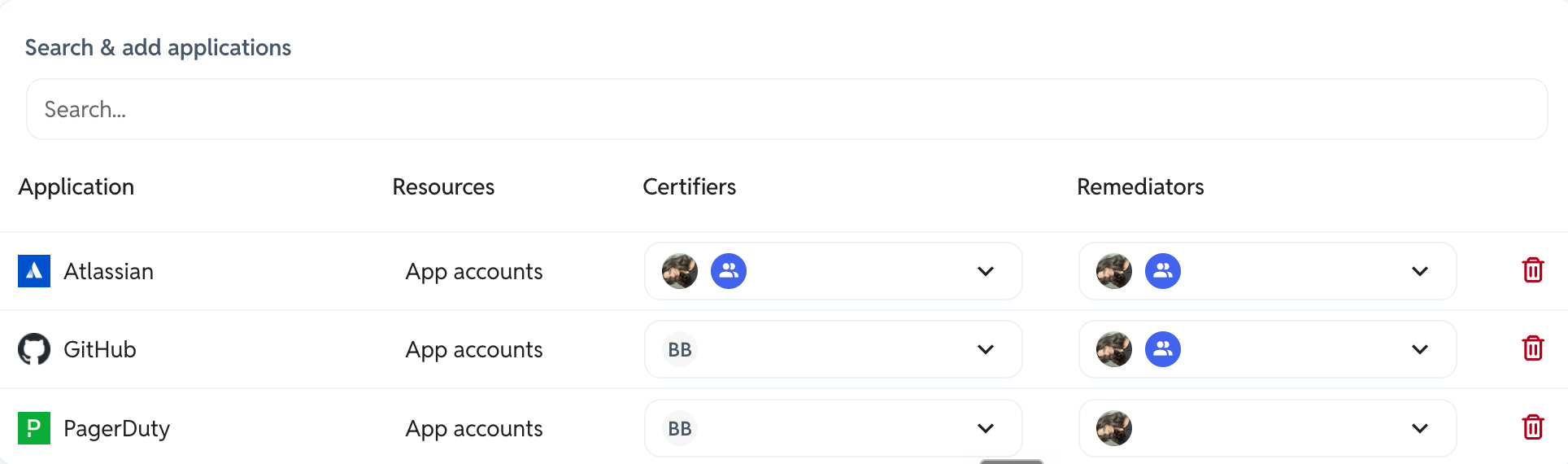
Use Search & add applications to add every app in scope. Each app you pick adds a row to the table below, and each row is one scope.
For each row, set:
Column | What to choose |
|---|---|
Resources | App accounts: Reviews every account in the application — this is the normal choice. Pick resource… narrows the scope to who can reach one specific thing inside the app (a repo, a group, a bucket). |
Certifiers | The person who knows whether this access should exist — usually the application owner. YeshID suggests people based on who administers the app. |
Remediators | The person responsible for actually removing access via the remediation workflow. |
You can add the same application more than once to review different parts of it separately. Auditing two GitHub repos plus GitHub account access is three picks, so three rows.
Click Start campaign when the table is complete. Owners get an "Audit started" notification pointing them at the Snapshot step. Note: The person who creates the campaign is excluded from this notification.
⚠ Certifiers and remediators do not need to be YeshID administrators. Being named on a scope is what grants them access to that work. You don't need to change anyone's role to bring them into a review.
Part 2: Capture the Snapshot
This is the step people get stuck on, so it's worth understanding what it's for: the snapshot is the frozen dataset the rest of the audit runs against. Until it's captured, certification and remediation are locked.
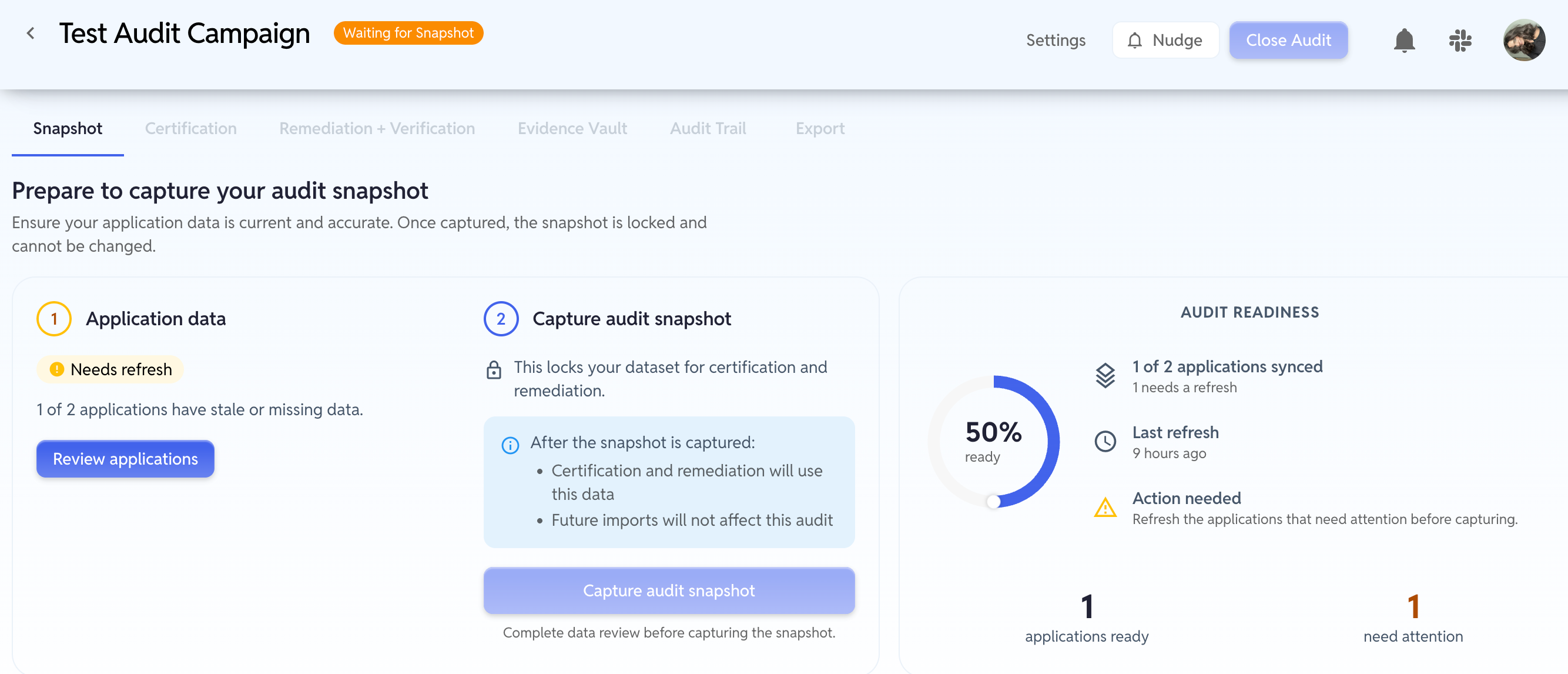
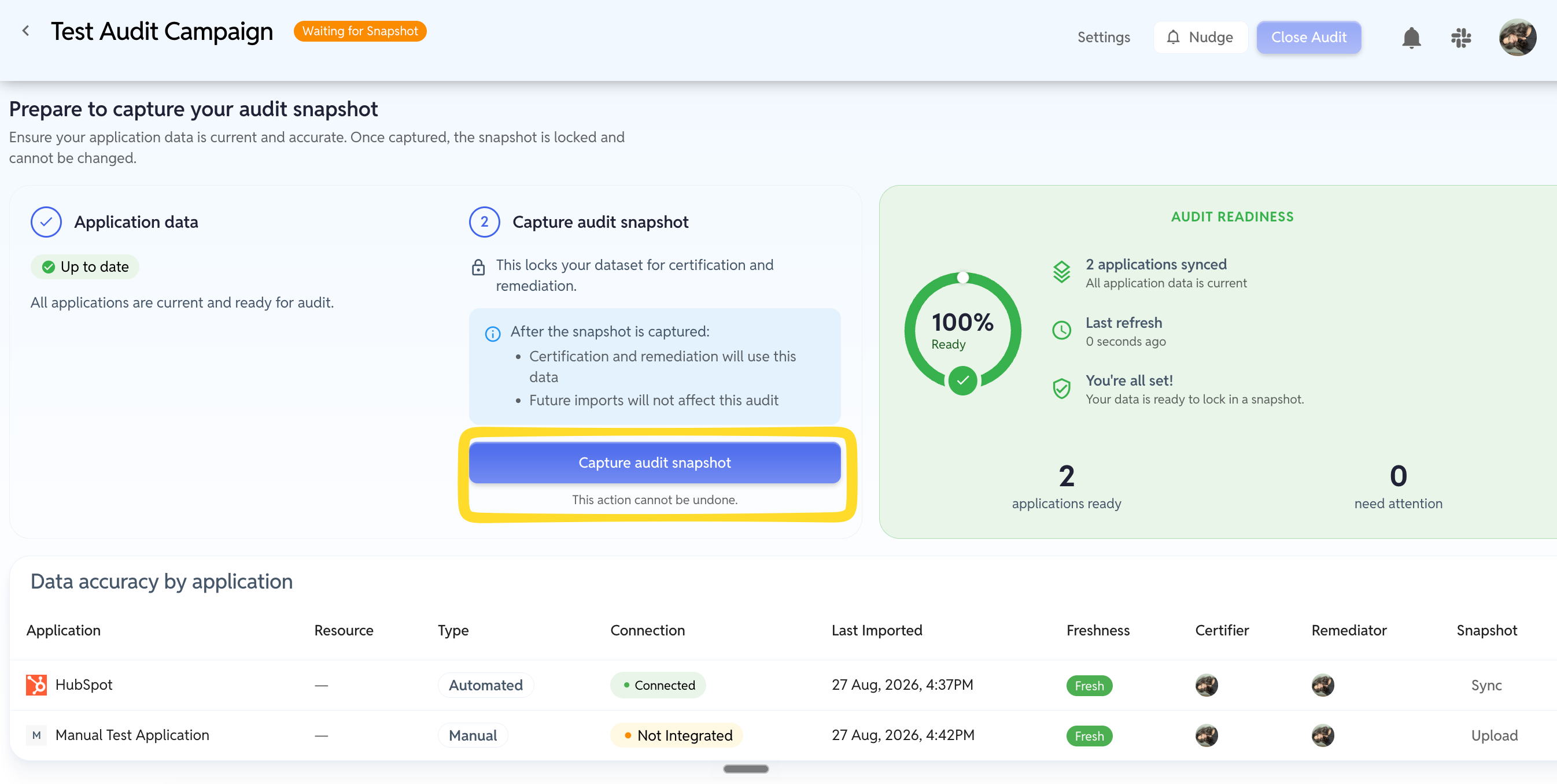
The Snapshot tab opens on a card called Prepare to capture your audit snapshot, with two numbered steps and an Audit readiness dial on the right.
Update application's current access
Step 1, Application Data shows one of three states:
Chip | What it means | What to do |
|---|---|---|
Up to date | Every app's data is current. | Nothing — move to Step 2. |
Needs refresh | Some apps have stale or missing data. | Refresh them (below). |
No applications | Nothing is in scope yet. | Add applications via Settings. |
Click Review applications to jump to the Data accuracy by application table underneath. Every scope has a row, and the last column holds the action button you need:
Sync for connected applications. Pulls the current user list straight from the app.
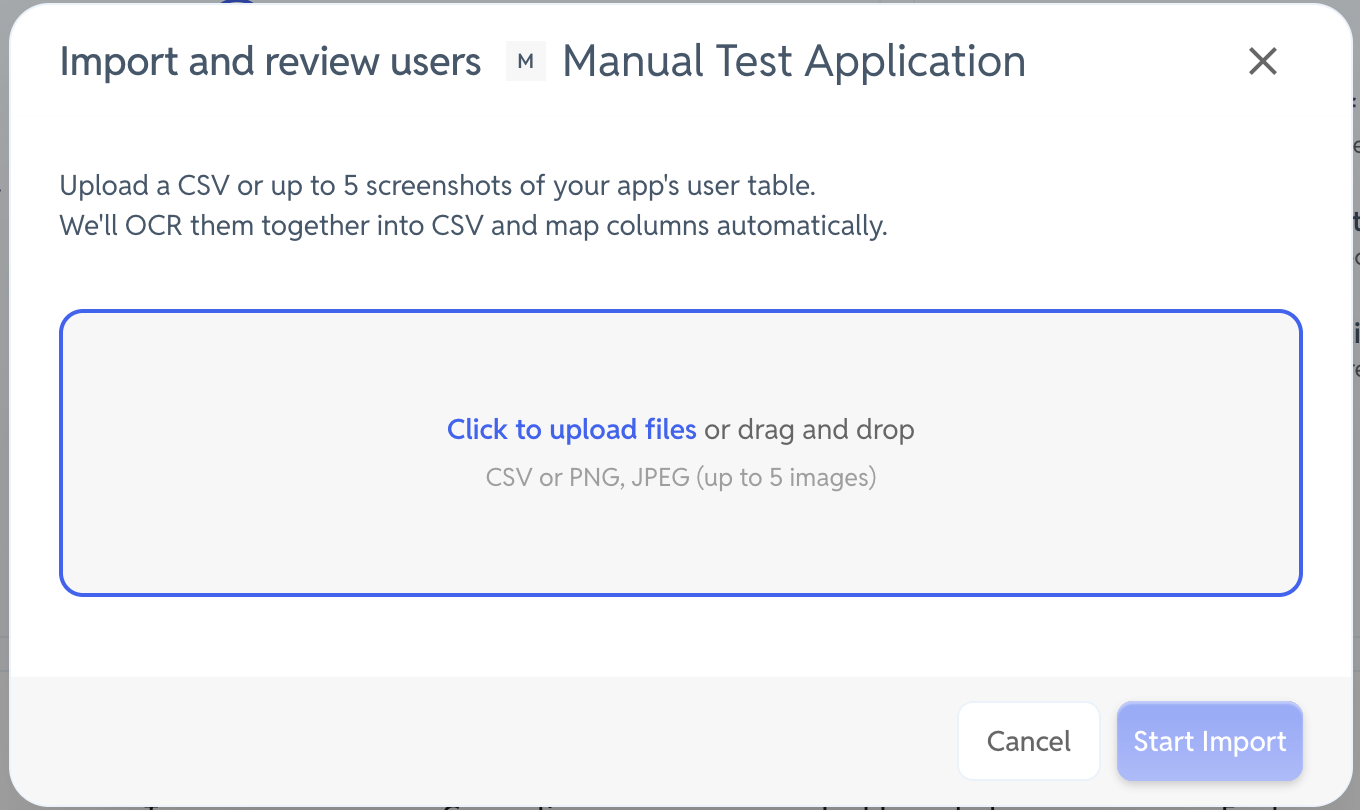
Upload for applications YeshID isn't integrated with. Opens the Import and review users dialog.
Once done, the button reads Re-Sync or Re-Upload and a green Done chip appears.
💡 This button is the whole step. It sits at the right-hand end of each row. It's the Sync / Upload link on the far right of each application row.

The Freshness column tells you where each app stands:
Freshness | Meaning |
|---|---|
Fresh | Imported within the last 24 hours. |
Stale | Last import is more than 24 hours old. |
Missing | Never imported. |
Uploading for a non-integrated application
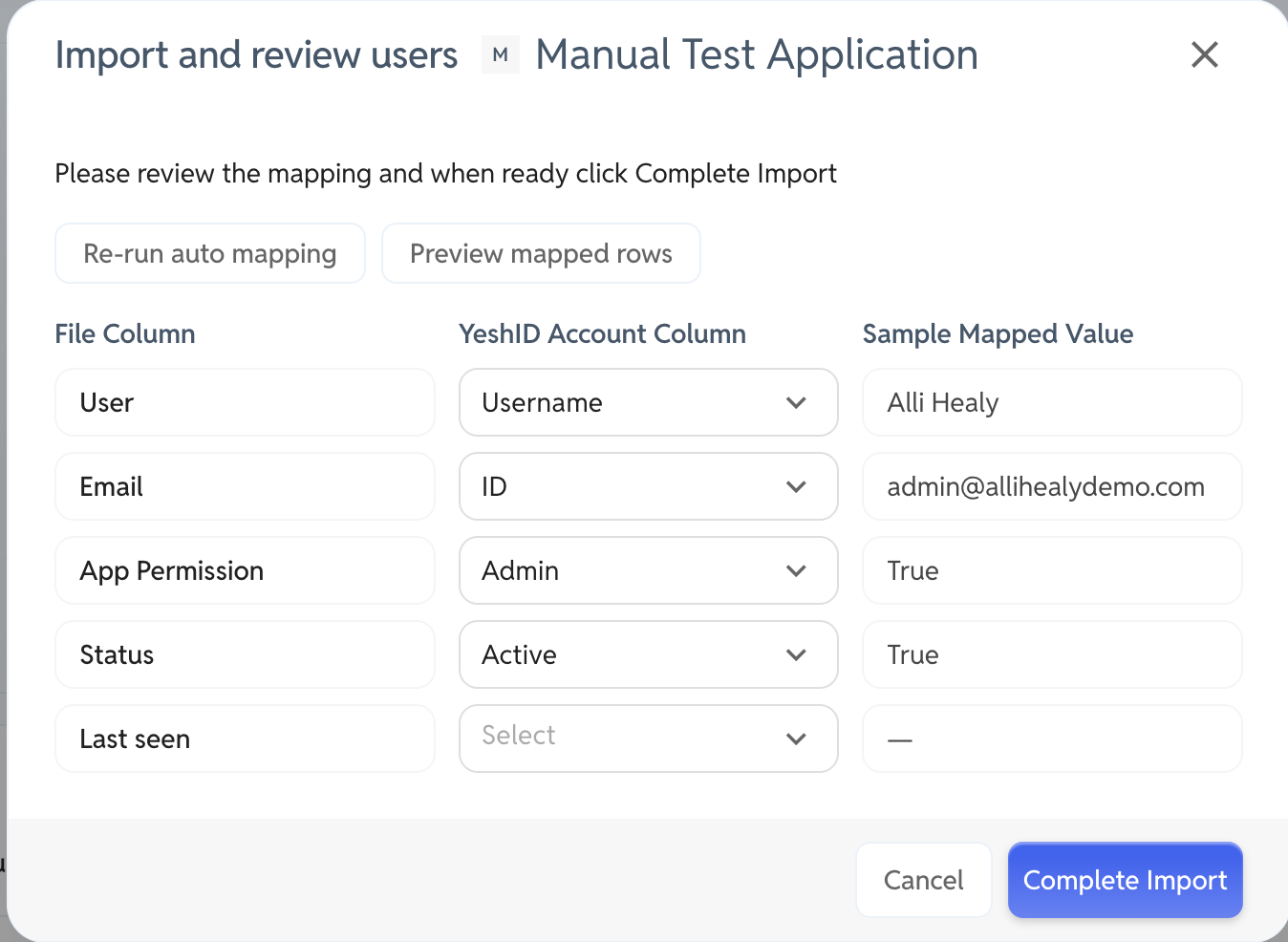
Choosing Upload opens Import and review users, which accepts a CSV or up to five screenshots of the app's current user table. Screenshots are OCR'd into a CSV and the columns are mapped automatically; you review and correct the mapping before confirming.
Two things worth knowing:
The upload replaces that application's user list in YeshID, not just inside the audit. After the import, the app's user list under Applications reflects what you uploaded. That's the point — it's how you true up apps that were managed outside YeshID.
Upload the list as it stands today. The snapshot captures the current state; it isn't trying to reconstruct history. Whatever you upload becomes the baseline this audit is measured against.
If the app's user list shows roles or permission levels, include that column — it carries through to certification, so reviewers can see what kind of access each person has, not just that they have some.
Capture the snapshot
Once every application reads Up to date, the readiness dial turns green and Capture audit snapshot becomes clickable.
This action cannot be undone. After capture:
Certification and remediation run entirely off this dataset.
Later syncs, imports, and access requests will not change what reviewers see.
The Certification, Remediation, Evidence Vault, Audit Trail, and Export tabs unlock.
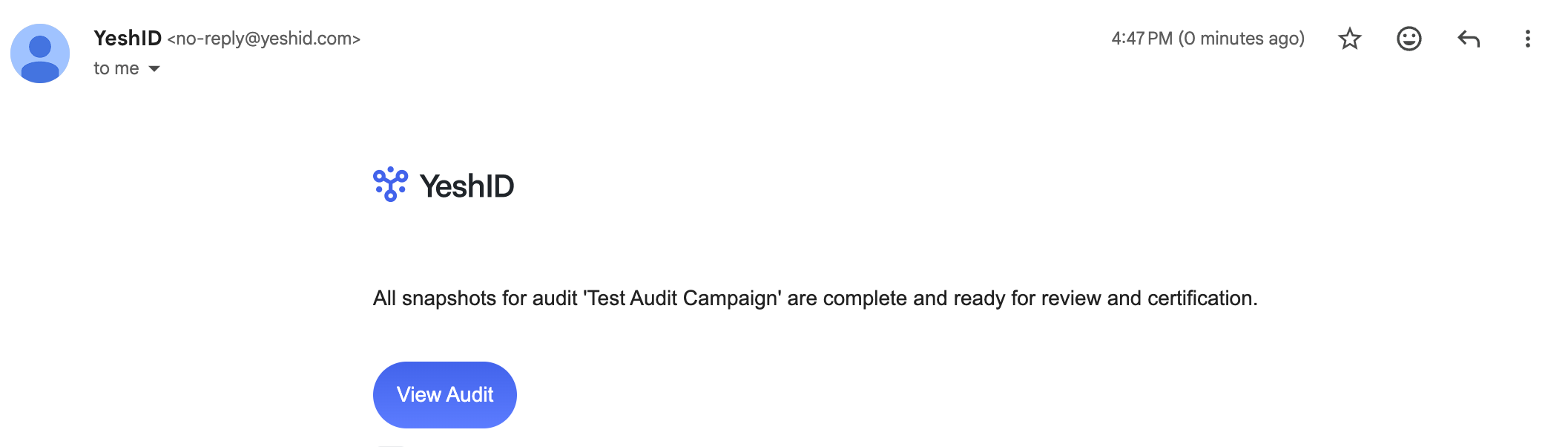
The moment the snapshot lands, every certifier gets a notification: "Audit snapshots completed — all snapshots for audit '' are complete and ready for review and certification." This is what pulls your application owners into the review, so make sure the certifier assignments are right before you capture.
Part 3: Certify access
This is the part to send to your application owners. Everything below happens on the Certification tab, and it's all a certifier needs to do.
A certifier gets a notification with a View Audit link. Following it opens the campaign on the Certification tab, showing the findings for the applications they were assigned.

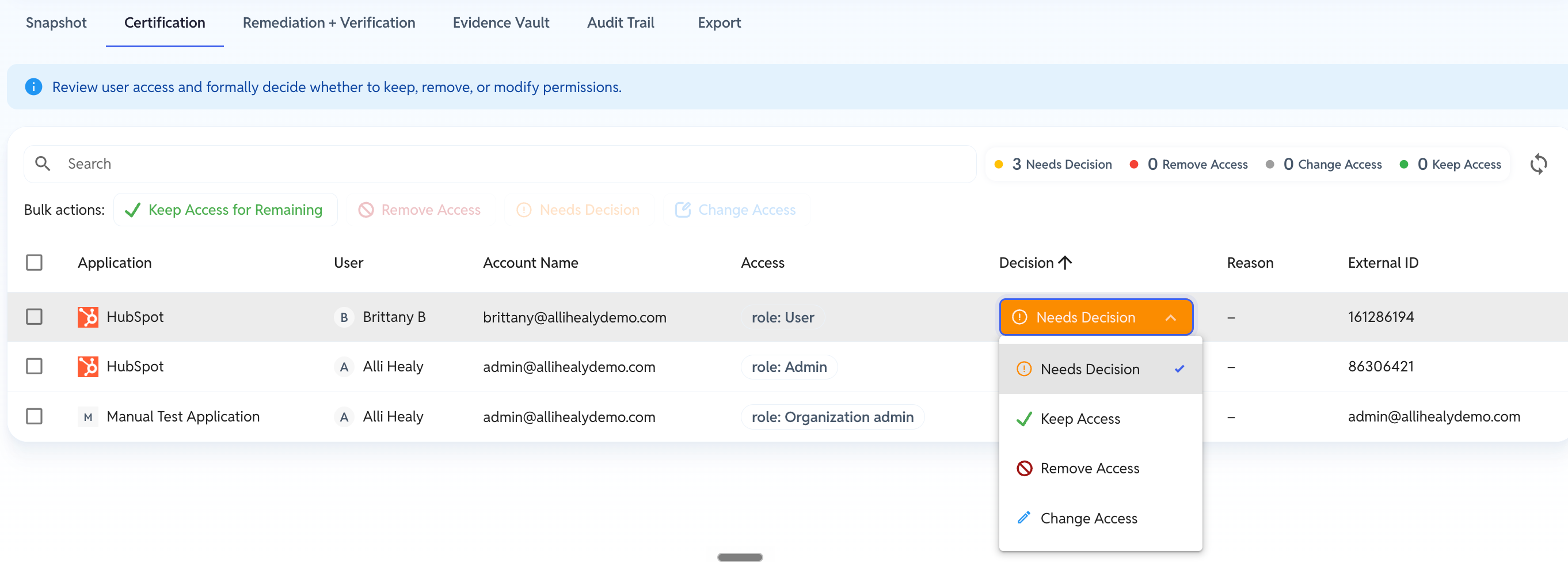
Each row is one person's access to one application. For every row, pick a decision:
Decision | What it means | What it requires |
|---|---|---|
Keep Access | This access is correct. Leave it. | Optional note. |
Remove Access | This access should not exist. | A written reason — this is what your auditor reads. |
Change Access | The person should keep an account but at a different level (different role or group). | The new access, plus a reason. |
Needs Decision | Not decided yet. The default. | Nothing — but the campaign can't close while any remain. |
Change Access isn't offered on every row — it doesn't apply to resource-grant or credential findings, where the only meaningful choices are keep or remove.
Working through it quickly
Select rows with the checkboxes and use the Bulk actions row above the table:
Keep Access — applies to your selection. With nothing selected it reads Keep Access for Remaining and clears every remaining undecided row at once.
Remove Access — bulk removal (you'll be asked for one shared reason).
Needs Decision — puts rows back to undecided.
Change Access — bulk role/group change.
A common pattern: work through the exceptions first — anyone who's left the team, changed roles, or has more access than they need — mark those Remove Access or Change Access, then use Keep Access for Remaining to certify the rest in one click.

When every finding in a scope is decided and at least one is a removal, the scope's remediators are notified: "Remediation needed for audit application."
Part 4: Remediate and verify
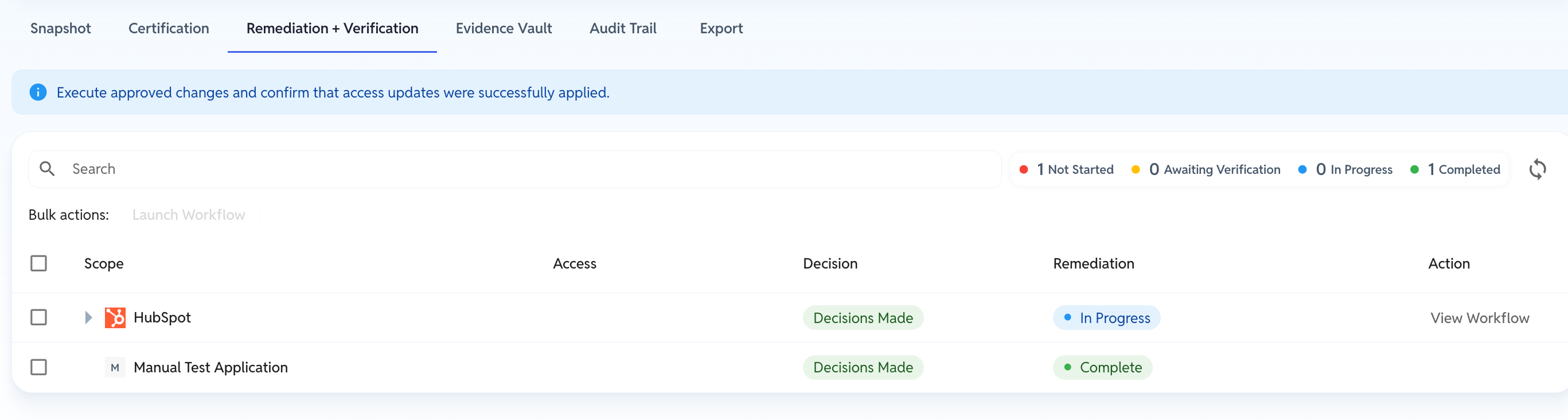
The Remediation + Verification tab lists each scope and what's outstanding. Only removals and access changes appear here — anything marked Keep Access is already done.
The sequence per scope:
Launch Workflow — creates a real YeshID workflow to make the access changes. You can launch several scopes at once with the bulk Launch Workflow button.
The status moves through In Progress, then to Awaiting Verification (or Awaiting Evidence).
Verify — YeshID re-checks the application and confirms the access is actually gone.
For connected apps, clicking "Verify" will sync the application and verify the user(s) were removed.
For apps YeshID isn't integrated with, this button reads Upload Evidence instead: attach proof of the removal (PDF, DOC, DOCX, TXT, CSV, PNG, JPG, or JPEG).
If verification can't reach the app, it reads Retry Verify.
Status lands on Complete.
Status | Meaning |
|---|---|
Not Started | No workflow launched yet. |
In Progress | Workflow running. |
Awaiting Evidence | Manual app — upload proof of removal. |
Awaiting Verification | Workflow finished; verification not yet run. |
Verifying | Verification in progress. |
Complete | Verified. |
Failed / Sync Failed | Something went wrong; the reason shows under the chip. |
Once a scope passes verification, its decisions lock.
Part 5: Evidence, export, and close
Evidence Vault
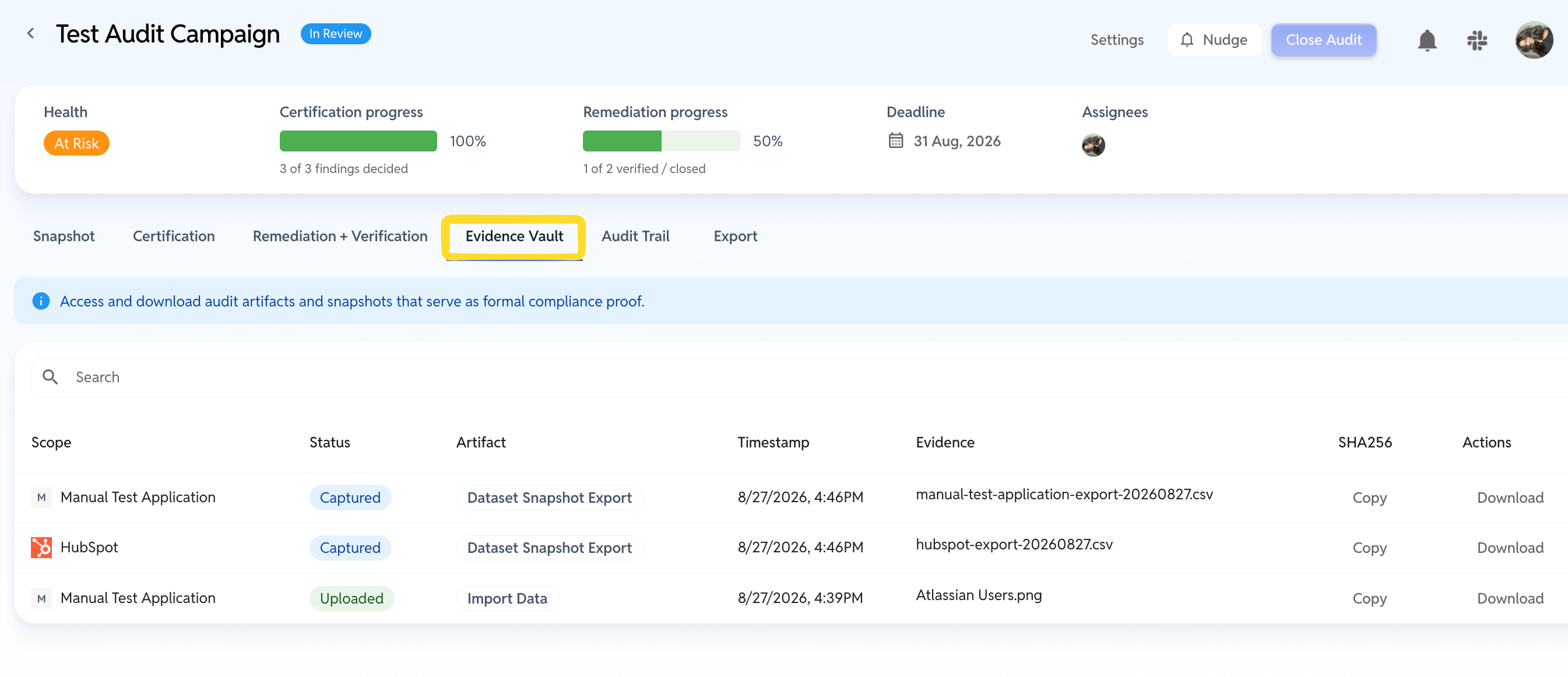
Every artifact the campaign produced — snapshot files, manual uploads, verification results — with a timestamp and a SHA256 hash, downloadable individually. This is your integrity trail: the hash proves the file handed to your auditor is the file YeshID captured.
Audit Trail
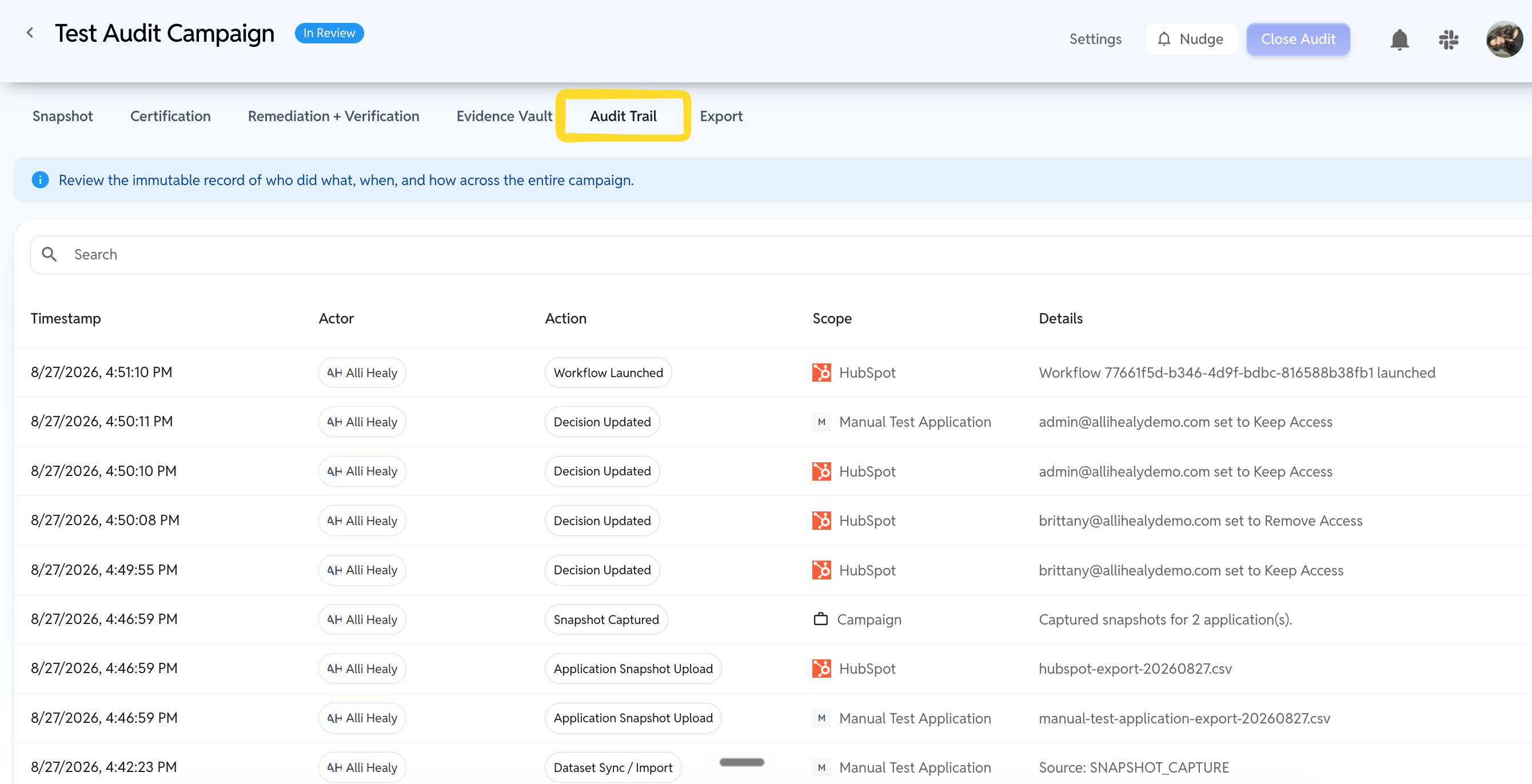
An immutable log of everything that happened: timestamp, actor, action, scope, details. This is what you show when someone asks "who approved this, and when?"
Export
The Export tab produces a PDF report in two formats:
Full (Appendices) — summary visuals, remediation outcomes, and full appendices. This is the auditor version.
Executive Summary — the short version for leadership.
Click Download PDF Report.
Close the audit
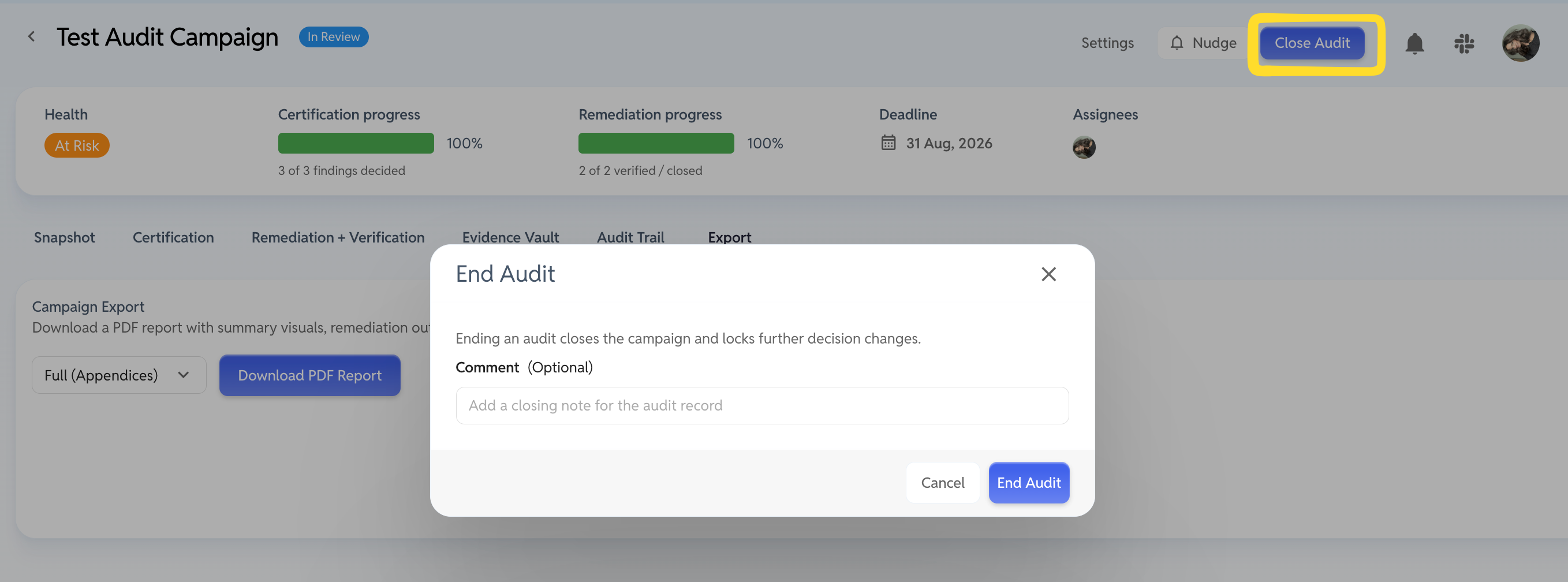
Use Close Audit in the campaign header. You'll be asked for an optional closing comment, which goes into the permanent record.
Closing is blocked until:
Every finding has a decision (nothing left on Needs Decision), and
Every scope with removals has passed remediation verification.
Once closed, the campaign is read-only.
Nudging assignees
If a campaign is stalling, use Nudge in the campaign header. It opens Nudge Outstanding Work and sends reminders only to people with something still assigned to them. When there's nothing left, the button is disabled and reads "Everyone is up to date."
Owners can also change assignments mid-campaign via Settings — swap a certifier who's on leave, add a remediator, or toggle self-certification.
Who gets notified, and when
For a decentralized organization this is the part that matters most — people are pulled into the review automatically, and you don't have to chase them by hand.
When | Who's notified | Message |
|---|---|---|
Campaign is created | Owners, except whoever created it | "Audit started — ready for snapshot capture." |
Snapshot is captured | All certifiers | "Audit snapshots completed — ready for review and certification." |
All decisions made on a scope and it includes removals | That scope's remediators | "Remediation needed for audit application." |
You click Nudge | Anyone with outstanding work | Reminder. |
Every notification carries a View Audit link straight to the right tab.
Only the first row skips its own trigger. Capturing the snapshot notifies every certifier including you, and completing decisions notifies every remediator on that scope including you — so if you hold several roles, expect to hear from those two.
Templates
A template is a saved campaign setup: the applications, the scoping, the certifiers, the remediators, the self-certification rule. From a template you can either let YeshID create campaigns automatically on a schedule, or spin one up by hand whenever you need it. You can do both from the same template.
Templates live under Access > Audit Campaigns > Templates.

Create a template
Click Create template on the Templates tab. The form is the campaign form plus a few extras:
Field | What it does |
|---|---|
Template name | What you call the template itself, e.g. |
Description | The purpose of the template. |
Campaign name template | The name each generated campaign gets. Supports placeholders — |
Campaign description | The description each generated campaign gets. |
Owners | Who runs the campaigns this template creates. |
Allow self certification | Same rule as a one-off campaign. Leave it off for SOC 2 / ISO. |
Make this a recurring audit | Off by default. Off means the template is a reusable blueprint you start by hand. On reveals the schedule. |
Applications | Identical to campaign setup — add each app, choose App accounts or a specific resource, assign certifiers and remediators. |
Then Create template.
The certifiers and remediators you set here become the defaults for every campaign the template creates. That's the point — but it also means a template quietly goes stale when people change roles. Worth a skim at the start of each cycle.
Put it on a schedule
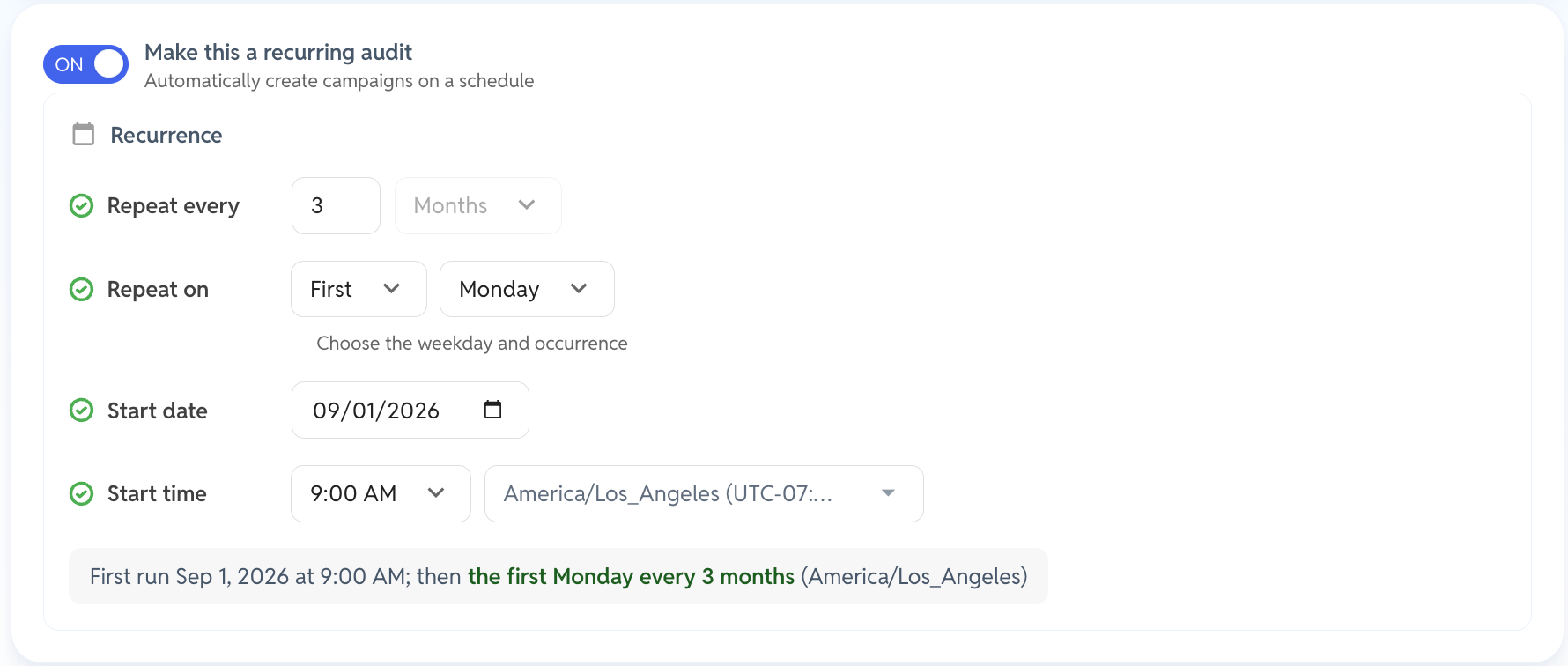
Switch on Make this a recurring audit and set the recurrence. It's monthly with an interval, on a chosen weekday and occurrence — so:
You want | Set it to |
|---|---|
Quarterly | Repeat every 3 Months |
Twice a year | Repeat every 6 Months |
Monthly | Repeat every 1 Month |
Annually | Repeat every 12 Months |
Then pick the weekday and which occurrence of the month — the first Monday every 3 months, for example. There's no option literally labelled "Quarterly"; an interval of 3 months is how you get it.
The Templates list then shows Next Run and Last Run so you can see what's coming.
Or start one by hand
You don't need a schedule to get value from a template. Leave Make this a recurring audit off and the template becomes a blueprint you run whenever you like — useful for an ad-hoc review, a re-run after a failed cycle, or an off-cycle audit your assessor asks for.
Either way, the action is the same. On the Templates list, open the ⋮ menu on the template's row and choose Start campaign now — or open the template and use the Start campaign now button in its header.
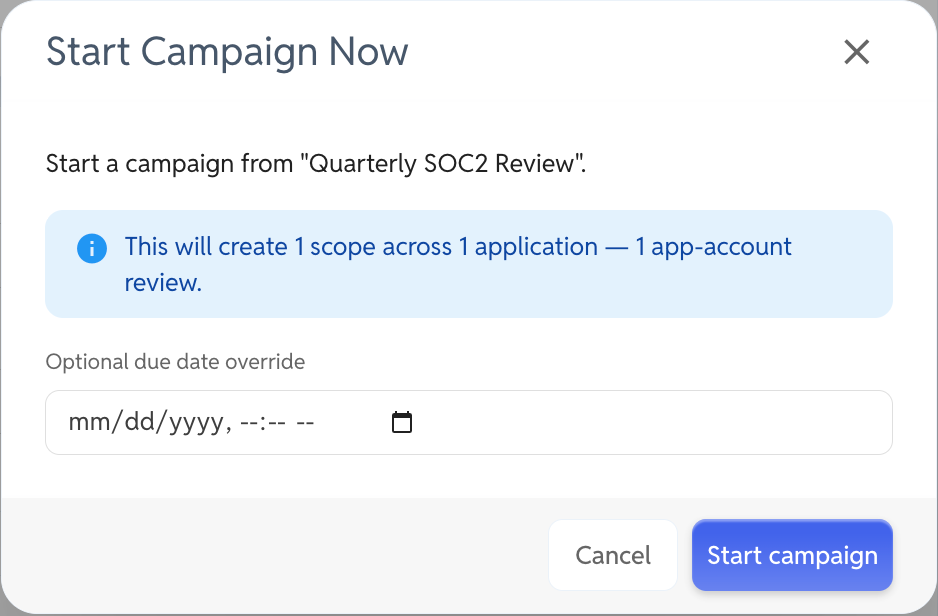
The dialog shows you what you're about to create:
A scope preview — "This will create 12 scopes across 9 applications — 9 app-account reviews + 3 resource reviews." Worth reading before you confirm; a template with resources in it can fan out further than you'd expect.
An optional due date override. Leave it blank to use the template's default deadline, or set a specific one for this run.
Click Start campaign and you land in a brand new campaign with the scoping already done — ready for the Snapshot step.
Template statuses
Status | What it means |
|---|---|
Manual | No schedule. It only creates campaigns when you click Start campaign now. |
Active | Scheduled and running. Campaigns generate automatically. |
Paused | Scheduled but suspended. Nothing generates until you resume. |
Failed | A scheduled run couldn't complete. Fix the cause, then Reactivate. |
Managing a template
From the ⋮ menu on the list, or from the template's own page:
Open — view and edit. Change applications, certifiers, remediators or the schedule, then Save changes. Edits apply to future campaigns; campaigns already created are untouched.
Start campaign now — create a campaign immediately, schedule or no schedule.
Pause / Resume — stop and restart automatic generation without losing the setup.
Reactivate — bring a Failed template back.
Delete — removes the template. Campaigns it already created stay where they are, along with their evidence.
Troubleshooting
What you're seeing | What it means | What to do |
|---|---|---|
Capture audit snapshot is greyed out | At least one application still has stale or missing data. | Click Review applications and Sync/Upload the flagged rows. |
Certification tab is disabled | No snapshot yet. | Finish the Snapshot phase first. |
An app shows Not Integrated | YeshID has no connection to it. | Use Upload to provide the user list, or connect the app so future audits sync automatically. |
Freshness says Missing | The app has never been imported. | Sync or Upload it. |
User counts look wrong for a manual app | Users were added directly in the app, outside YeshID. | Upload a current export — it replaces the list in YeshID and trues the app up. |
Close Audit is disabled | Findings still undecided, or removals not yet verified. | Check the Certification tab for Needs Decision rows and the Remediation tab for anything not Complete. |
A certifier can't see the campaign | They aren't assigned to any scope. | Add them as a certifier via Settings. |
Started a campaign and no notification arrived | The creator is excluded from the "Audit started" notification, so a solo-owner campaign notifies nobody. | Expected. Add a second owner to see it fire, or capture the snapshot — the certifier notification has no such exclusion. |
Snapshot data changed after capture | It didn't — that's by design. | Later syncs and access requests don't affect a captured snapshot. |
A template's Recurrence says Manual only | Make this a recurring audit is off. | Open the template, switch it on, set the recurrence, Save changes. Or just use Start campaign now each cycle. |
A template shows Failed | A scheduled run couldn't complete. | Open it, check the applications and assignees still exist, then Reactivate. |
Edited a template but the running campaign didn't change | Template edits apply to future campaigns only. | Change the live campaign directly via its Settings. |
Good habits
Get scoping right before you capture. Certifiers are notified at capture, so fix assignments first — otherwise the wrong people get pinged.
Do the manual uploads in one sitting. Gather exports from every non-integrated app owner up front, upload them all, then capture. Chasing them one at a time stretches the snapshot step out for days.
Connect what you can, once. Every app you integrate becomes a Sync click instead of a chased CSV, every cycle from here on. If an app has an API or SCIM endpoint, it's worth connecting even if you never provision through YeshID — the accounting alone pays for itself at audit time.
Include roles in your CSVs. "Has access" is a weaker finding than "has admin access." Reviewers make better decisions when they can see the level.
Write real removal reasons. "Left the company 12 Mar", not "n/a". The reason column is what your auditor reads.
Name campaigns for the period they cover.
Q1 2026 SOX ReviewbeatsAccess Review. If you're using a template, the{{quarter}}and{{year}}placeholders do this for you.Turn your second campaign into a template. Run the first one manually to learn the shape of it, then save that setup as a template — you'll know by then which apps are really in scope and who the right certifiers are.